U.S. Businesses are Switching to Cloud-Based Payroll Software
Cloud-Based Payroll Software is transforming payroll for U.S. businesses by automating salary processing, tax filing, and compliance. With online access, real-time updates, and strong security, it helps companies manage distributed teams efficiently and scale without extra admin work.
Blog
U.S. Businesses are Switching to Cloud-Based Payroll Software
Cloud-Based Payroll Software is transforming payroll for U.S. businesses by automating salary processing, tax filing, and compliance. With online access, real-time updates, and strong security, it helps companies manage distributed teams efficiently and scale without extra admin work.
Payroll is a crucial corporate task. It must be done correctly and on time. Plus, it needs to follow the law. For many businesses, especially those with teams in multiple states, this task is often boring and full of errors.
In recent years, many businesses in the United States have changed. They are now using cloud-based payroll software. This makes it easier to manage employee data, taxes, and salaries.
Cloud payroll runs completely online, unlike traditional systems that need to be installed locally or updated by hand. It calculates automatically, updates compliance info in real time, and lets you view it from anywhere.
For growing businesses, improving technology is key. It helps make things easier.
What Is Cloud-Based Payroll Software?
Cloud-based payroll software is an online tool. It automates salary processing, tax submissions, and compliance with rules. It keeps all of the payroll information for employees safe in the cloud, where it can be accessed from any device that is connected to the internet.
When laws change, you must install, back up, and update traditional payroll software manually. Cloud systems take care of all of that on their own. The program uses the latest IRS and state standards to calculate gross pay and deductions. It also processes direct deposits automatically, so there’s no need to enter them by hand each pay cycle.
This change means that most U.S. firms, big and small, no longer have to rely on IT professionals or systems that aren’t connected to the internet. Naturally, payroll is faster, cleaner, and more compliant.
How Cloud Payroll Software Works
The technique is simple, but it depends on accuracy. Everything starts with correct information about employees, like their job title, hours worked, pay rate, and tax status.
Setting up data: HR or finance teams put information about employees and contractors into the system.
The program automatically figures out gross compensation, deductions, and employer taxes.
Payments and filings: Employees’ salaries go straight into their accounts by ACH or digital paycards, and taxes are filed electronically with the IRS and state governments.
Records and storage: Every pay run, filing, and deduction is saved securely online for future reference or audits.
The end result?
Accurate payroll without the stress of using a spreadsheet. And because the data is stored in the cloud, teams can still process payroll even when they are not in the same place.
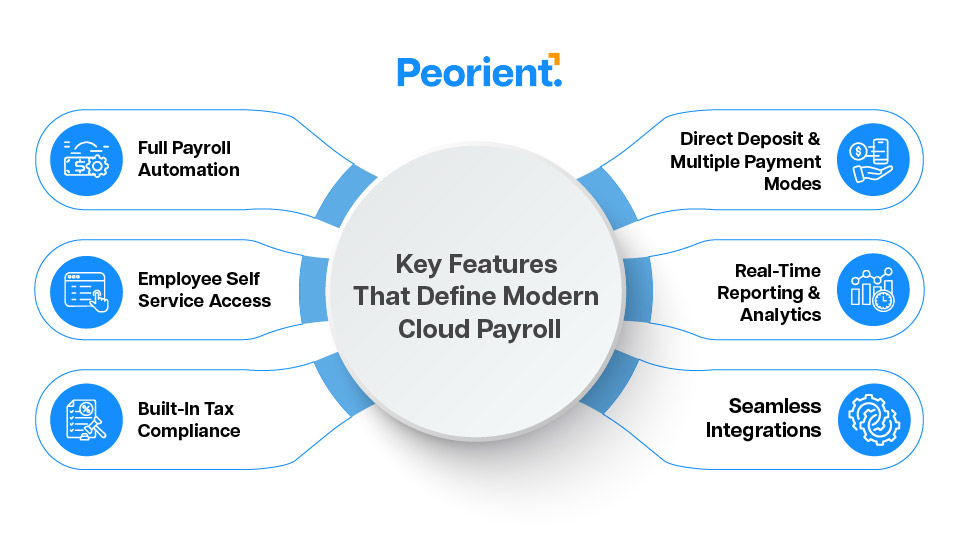
Key Features That Define Modern Cloud Payroll
1. Full Payroll Automation
Every pay cycle operates on its own, from figuring out how much to pay to taking out taxes and keeping track of benefits. The technology changes with federal and state laws, so HR personnel don’t have to keep up with compliance changes.
2. Employee Self-Service Access
Employees may log in, see their pay stubs, obtain W-2 forms, or change their bank information without having to approach HR for help. This makes things easier for the people in charge and lets staff manage their own records.
3. Built-In Tax Compliance
Cloud payroll platforms keep track of changes to IRS, FICA, FUTA, and state-level rules on their own. Tax forms including 941, 940, W-2, and 1099 are made and filed electronically on time, which lowers the chance of getting a fine.
4. Direct Deposit and Multiple Payment Modes
Secure ACH transfers, digital wallets, or payroll cards are used to process payments. Even if they live in separate states or time zones, employees get paid on time.
5. Real-Time Reporting and Analytics
You can get payroll information right away. Dashboards help finance teams track labor costs, tax liabilities, and overtime trends. This tracking aids in making better decisions and managing finances more effectively.
6. Seamless Integration
Most U.S. payroll software connects directly with accounting programs like QuickBooks. It also works with ERP and HR apps like BambooHR. Integration keeps the workflow uniform and stops data from being duplicated.
Why U.S. Businesses Are Switching to Cloud Payroll
1. Less Paperwork, More Precision
Automation gets rid of the necessity for spreadsheets that you have to fill out by hand and data entry that you have to do over and over again. Once set up, the system takes care of regular pay runs, which means fewer mistakes and more accurate results.
2. Compliance Without Stress
Federal and state regulations about payroll in the U.S. change all the time. Cloud solutions update compliance requirements automatically. This means you won’t miss filings or use outdated tax tables.
3. Accessibility From Anywhere
Payroll data is always available, whether a business is based in one city or oversees a distributed staff across several states. Through the web, remote teams may safely handle and approve payroll.
4. Transparent Employee Experience
Employees can look at their pay, benefits, and deductions at any time. This openness fosters trust and cuts down on questions about payroll for HR.
5. Strong Data Protection
Trustworthy U.S. payroll companies keep sensitive information safe. They use SSL encryption, multifactor authentication, and follow SOC 2 compliance to protect bank account and Social Security numbers.
6. Lower Costs and Higher Efficiency
Cloud systems do away with the need for servers, IT support, and paper work. Companies pay a membership charge that goes up with the number of employees, so it’s a predictable and useful cost.
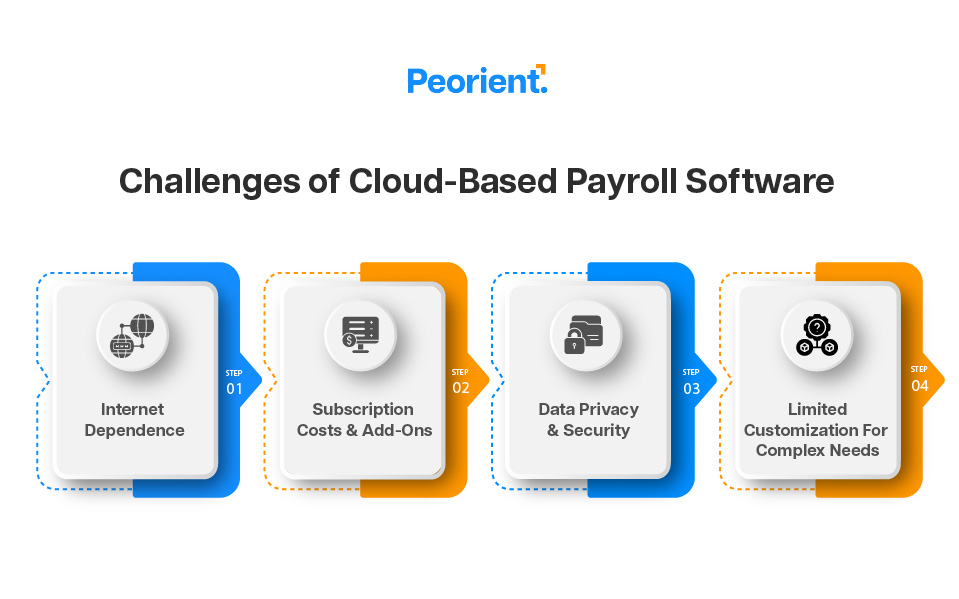
Challenges of Cloud-Based Payroll Software
No system is perfect, and there are certain things to think about while using cloud payroll. Even if the pros are more important than the cons, knowing what problems might come up helps businesses plan better.
1. Internet Dependence
For cloud payroll to work, you need to have a stable internet connection. Processing can take longer in regions with weak or unstable connectivity. But most of the best providers now include offline backups and sync tools to keep things running smoothly.
2. Subscription Costs and Add-Ons
The subscription model might include hidden fees. These could be for extra features, integrations, or data storage. This happens even though the program cuts operational costs. Before increasing consumption, organizations need to thoroughly look over their price levels.
3. Data Privacy and Security
Payroll has sensitive details, such as bank account numbers, Social Security numbers, and tax info. Choose a U.S.-based service with SOC 2 Type II certification. Look for strong encryption and regional data hosting. This way, you can be confident you are following privacy rules.
4. Limited Customization for Complex Needs
Some businesses have unique pay structures or specific union needs. They might find that standard options don’t fit. Enterprise-grade providers generally offer APIs or modular add-ons to accommodate these instances.
How to Choose the Right Cloud-Based Payroll Software
When choosing a payroll system, it’s not only about automation; it’s also about how well it fits your needs. The correct software should fit with the size of your business, the rules it has to follow, and its plans for growth.
1. Compliance Coverage
There are three levels of taxes in the U.S.: federal, state, and sometimes city. The best software automatically changes tax codes, wage limitations, and filing deadlines, so you don’t have to do anything.
2. Ease of Use
It’s important to have a clean interface. HR and financial departments should be able to handle payroll, prepare reports, and fix mistakes without needing help from IT.
3. Integration and Scalability
Choose software that fits well with your existing tools, like accounting, HR, or time-tracking apps. It should be able to grow with your staff without slowing down.
4. Security Standards
Make sure the service meets SOC 2 and GDPR if handling international data. It should also use SSL encryption and support MFA for all users.
5. Support and Transparency
For payroll to run smoothly, customers need help with onboarding, clear billing, and 24/7 customer support.
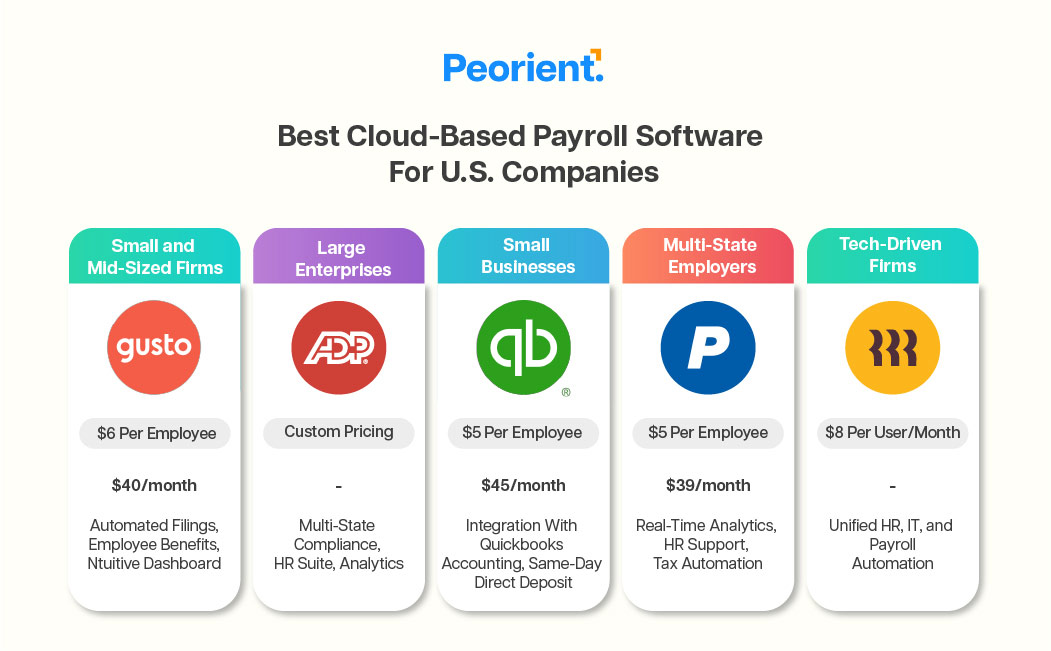
Best Cloud-Based Payroll Software for U.S. Companies
These systems remain the top choice for U.S. businesses. They are reliable, compliant, and provide integration support.
Cloud Payroll and Employer of Record (EOR): How They Work Together
When companies hire workers from abroad or expand globally, payroll becomes more complex. This is where cloud payroll and Employer of Record (EOR) services work well together.
An EOR is the official employer for workers from other countries. They handle contracts, payroll, and compliance with local laws. When used with cloud payroll, it makes a single system that:
Handles payments in different currencies and countries
Ensures that local tax and labor rules are followed
Makes onboarding and managing benefits easier
No need to build up local businesses abroad
Cloud payroll and EOR services help U.S. businesses expand globally. They allow companies to maintain control over accuracy and compliance.
Why Cloud Payroll Is Becoming a Standard in the U.S.
Payroll isn’t just about paying people on time. It’s also about following rules, being transparent, and keeping data secure. Cloud payroll systems combine all three. They help companies stop manual work. This lets them focus on strategy, not spreadsheets.
Both new businesses bringing on their first employee and large firms in several states share the same demands: accuracy, reliability, and control. Cloud-based payroll does this all the time, which is why more U.S. firms migrate to it every year.
FAQs
1. Is cloud payroll safe for sensitive employee data?
Yes. Leading U.S. companies protect employee data by using encryption, two-factor authentication, and secure cloud storage that meets SOC 2 Type II criteria.
2. How much does cloud payroll cost for small businesses?
Most suppliers charge a flat price of $30 to $45 per month and $5 to $6 for each employee. The precise price depends on what services are included, such perks, time monitoring, or connectivity with HR.
3. Can cloud payroll handle tax filing automatically?
Yes. These systems automatically figure out, take out, and file federal, state, and local payroll taxes. They can even make W-2 and 1099 forms.
4. What happens if the internet goes down during payroll processing?
Most present-day platforms keep real-time data on safe servers. Once the connection is back up, all of the tasks that were on hold will sync immediately.
5. Can cloud payroll work for remote or hybrid teams?
Of course. Cloud systems are made for people who work from different places. You don't require office-based tools to process, approve, and keep an eye on payroll from afar.
6. Does cloud payroll integrate with HR and accounting systems?
Yes. Integrations with products like QuickBooks, Xero, or BambooHR make it easy to share data and stop people from doing the same thing twice.
Still comparing
EOR options?
Get a sample Peorient report showing how we compare provider costs and explain our recommendations.


 These systems remain the top choice for U.S. businesses. They are reliable, compliant, and provide integration support.