At-a-Glance Scorecard
Eight criteria, scored 1 to 5 based on verified review aggregates, vendor documentation, and buyer interviews. We weight pricing transparency and support availability heavily because both surface as recurring pain points in user reviews.
What's inside this Rippling review
Use the section list below to jump ahead. The full review takes roughly 15 minutes to read end to end.
- What Rippling actually is in 2026 (and what changed this year)
- Who should use Rippling and who should skip it
- The full feature stack: HR, Payroll, IT, EOR, Spend, and Rippling AI
- Rippling pricing 2026: real numbers, not the brochure
- Implementation timeline and what to expect
- Rippling pros and cons from 17,000+ verified reviews
- Rippling vs Deel vs Gusto vs ADP vs Remote — side-by-side
- Security, compliance and certifications
- Rippling for hiring in India (and where Remunance often wins)
- Alternatives quick picker
- Final verdict and 15 FAQs
What Rippling is in 2026 (and what changed this year)
Rippling started in 2016 as a way to fix a specific problem. When a new hire joined a company, somebody had to manually set up payroll, benefits, email, Slack, GitHub, a laptop, and a dozen other things. The data lived in five different systems. When somebody left, it took weeks to revoke all of that access. Parker Conrad and Prasanna Sankar built Rippling around a simple idea: keep one employee record and let every other system inherit from it.
Ten years later, Rippling has 25,000+ customers and a $16.8 billion valuation. The platform now covers HR, US and global payroll, time tracking, benefits administration, IT and device management, corporate cards, expense management, and Employer of Record services in around 80 countries. The 2026 update that matters most is Rippling AI, launched in March 2026, which lets you query employee data and trigger actions using plain English instead of building reports or clicking through screens.
Two things have not changed. Rippling still does not publish prices. And the platform is still built for buyers who already see value in consolidating HR, IT and finance on one record. If you only need payroll, you will probably overpay.
Who should use Rippling, and who should skip it
After reading 17,000+ reviews and speaking with a dozen buyers, the fit pattern is clearer than it used to be. Here is the honest split.
Rippling features: the full stack, module by module
Rippling sells under the umbrella name Rippling Unity, which refers to the foundational platform every module sits on. The Unity Platform is mandatory. Everything else is a paid module you bolt onto it. That distinction matters when you read pricing later.
1. The Unity Platform (your single employee record)
Unity is the shared data layer. Every employee has one record that contains personal information, employment terms, reporting line, location, payroll details, app access, and device assignments. When something changes anywhere, every downstream system updates automatically. Promote someone from senior engineer to engineering manager, and Rippling can update their title in your HRIS, change their Slack channel access, adjust their corporate card limit, and reroute approval flows in NetSuite. One change, six systems updated, no spreadsheets.
This is the architecture other providers cannot match without a major rebuild. Gusto and BambooHR have employee databases, but their IT and finance integrations are bolt-on, not native. Workday is closer architecturally but costs roughly five times as much and takes six to twelve months to implement.
2. Core HR and onboarding
This is the module nobody can skip. It includes the central employee directory, org chart, document management, e-signatures, PTO policies, custom workflows, and one-click onboarding. The onboarding flow is the standout: when you hire someone, Rippling can simultaneously trigger background checks, send NDA signatures, register the worker for payroll, enroll them in benefits, provision their email and core apps, and ship a pre-configured laptop. Users routinely cite this as the single biggest time-saver.
Offboarding works in reverse. One click revokes app access across every connected SaaS tool, ends payroll, schedules the laptop return, and prompts the final paycheck calculation. For security-conscious teams, that is meaningful.
3. Payroll: US and global
US payroll handles federal, state, and local tax filing automatically. Multi-state is included. Users report end-to-end pay runs taking under 90 seconds once employees are configured. Rippling files quarterly and annual tax returns and handles W-2s and 1099s at year-end. Contractor payments in 185+ countries are supported through the same flow, with multi-currency disbursement.
Global payroll for full-time employees is a separate matter. Rippling runs native payroll directly in the US, UK, Canada and Australia, and its India EOR guide (updated August 2026) says it runs India payroll on its own software through its Indian entity. Elsewhere, the payroll engine relies on partner entities in-country, which can introduce delays on edge-case tax matters. If you have employees in Germany or France, ask the sales team to walk you through their specific partner setup before you sign.
4. IT and device management
This is Rippling’s unfair advantage. No other HR platform handles laptop procurement, configuration, shipping, MDM enrollment, and retrieval at this depth. The flow looks like this: a new hire is created in Rippling, a pre-configured MacBook ships to their address with their company apps pre-installed, MDM policies enforce disk encryption and OS updates, and SSO is automatically provisioned. When they leave, Rippling locks the device remotely and arranges return shipping. The whole thing is one platform.
Rippling can do this in 30+ countries. For distributed teams, the IT module alone has paid for the entire Rippling contract for some of the buyers we have spoken with. App management adds another layer: software licenses get provisioned and deprovisioned with the employee record, which kills SaaS waste.
5. Spend management (corporate cards, expenses, bills)
Rippling Spend lets you issue corporate cards with dynamic policies tied to the employee record. A new contractor gets a card with a $500 limit and travel-only category restrictions, automatically. Expense reports auto-populate from card transactions. Bill pay handles vendor invoices. The data flows back into payroll and the general ledger via integrations with NetSuite, QuickBooks Online, Xero, and Sage Intacct.
6. Benefits administration and time tracking
Benefits admin connects directly to the major US carriers (Aetna, Anthem, Blue Shield, Cigna, Humana, Kaiser, United, Guardian, MetLife). Open enrollment runs through a self-service portal. ACA reporting and COBRA administration are bundled. Companies under 50 employees can also access Rippling’s PEO option for benefits pricing typically available only to much larger firms.
Time tracking includes geofenced mobile clock-in/clock-out, automated overtime calculation, scheduled shift management, and break-rule enforcement. Time data flows directly into payroll with no export step.
7. Employer of Record (EOR)
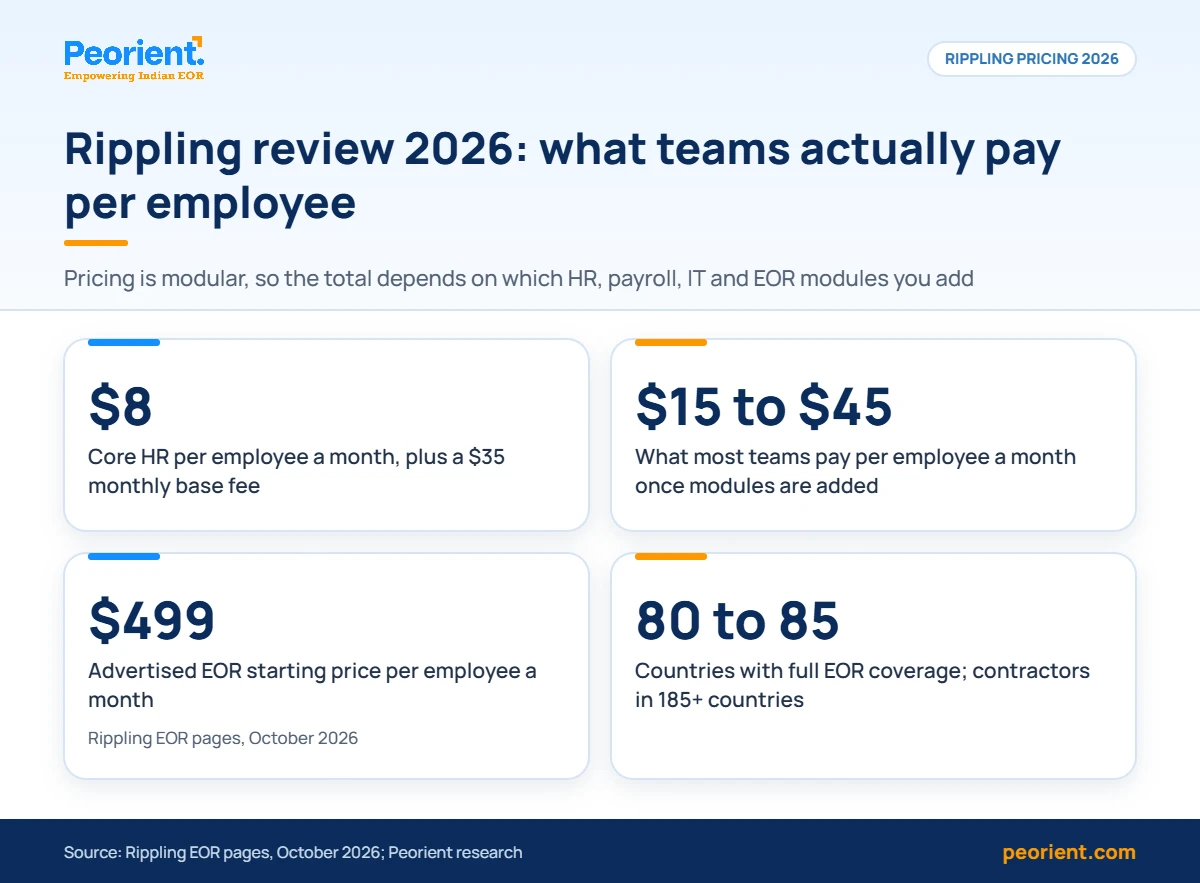
Rippling launched its EOR module in 2023 and has been steadily expanding coverage. As of mid-2026 the EOR operates in approximately 80 to 85 countries. Rippling owns entities in the major markets (US, UK, Canada, Australia, Germany, the Netherlands, India, and Singapore) and uses partner entities elsewhere. Rippling’s India and global EOR pages advertise EOR from $499 a month (October 2026), although the exact figure depends on country and contract size.
If you need broader coverage, look at Deel (150+ countries) or Remote (90+ countries, owned-entity strategy). For India-specific hiring, see the Remunance section below: there is a clear local specialist that consistently beats Rippling on cost and compliance depth in that market. If you are weighing Rippling against an EOR specialist instead, our Rippling vs G-P comparison covers pricing, coverage and India fit.
8. Rippling AI (new in March 2026)
This is the most significant 2026 update. Rippling AI sits on top of the Unity data layer and lets you query the system in plain English. Examples that work in the current build:
- “Show me voluntary terminations across the engineering org over the last 18 months, broken out by manager.”
- “What is the average compensation for senior product designers in our New York office versus our remote roles?”
- “Which employees on a J-1 visa have an expiration date in the next 90 days?”
- “Why was my paycheck lower this period than last period?” (from an employee)
Permissions are inherited automatically. A manager asking about salaries only sees their team. Rippling AI also triggers actions: tee up a comp adjustment, draft a workflow change, generate a report, all routed through your existing approval chain. This is one of the few enterprise AI rollouts that delivers more than chatbot-style responses, mostly because the underlying data model is unified rather than bolted together.
Rippling pricing 2026: what you will actually pay
Rippling does not publish a price list. Instead, you build your stack: pick the Unity Platform plus the modules you need, and a sales rep quotes you a number based on your headcount and contract length. The figures below are aggregated from verified third-party pricing data, buyer disclosures, and the Rippling pricing page. Treat them as directional, not guaranteed.
Platform fee and module breakdown
Real-world pricing scenarios
To make the cost real, here is what three typical buyer profiles end up paying based on documented quotes from buyers we have interviewed.
Implementation timeline and what to actually expect
The Rippling sales team will tell you that basic Core HR and Payroll can be live in two to three weeks. That is accurate for simple US-only deployments with under 50 employees. For everything else, plan for longer.
Every contract includes a dedicated implementation specialist for the first 30 to 60 days. The quality of that specialist varies. In the buyer interviews we conducted, half rated their implementation manager as excellent and a quarter described real friction post-handoff to the account team.
Ask for the named implementation manager during the sales process and request a quick reference call before you sign.
Rippling pros and cons (what 17,000+ reviews actually say)
What users consistently praise
- Single source of truth. The unified employee record removes data drift across HR, IT, payroll and finance. This is the most cited strength across G2 and Capterra reviews.
- Onboarding speed. Day-one productivity for new hires. Laptops, app access, payroll, and benefits all set up automatically. Buyers report saving 10 to 15 hours per hire on admin work.
- Workflow automation. The no-code recipe builder handles complex multi-step approval chains. Promotion changes, role transitions, and offboarding flows can be templated and reused.
- Mobile experience. The employee-facing mobile app is rated highly. Pay stubs, PTO requests, expense submission, and benefits enrollment all work without the desktop.
- Integration depth. 650+ pre-built integrations through the App Shop, including Salesforce, Slack, Workday, NetSuite, Xero, Greenhouse, Okta, and SAP SuccessFactors.
- Security stack. SOC 1, SOC 2, SOC 3, ISO 27001, ISO 27018, ISO 42001, and CSA STAR Level 2. The broadest certification list among workforce platforms.
- NPS score of 90. Rippling’s verified NPS on G2 averaged 89 per quarter from 2022 through early 2026. Category average sits around 60 points lower.
What users consistently complain about
- Pricing opacity. Custom-quote-only. No public price list. Budget modeling before sales engagement is essentially guesswork. This appears in roughly one in four reviews.
- Module stacking cost. Each module adds PEPM fees. Companies that bought four or five modules often see their per-employee cost run past $40 PEPM, well above the $8 starting price.
- Support access. Standard plans get email and chat only, business hours, US time zones. Phone support is reserved for accounts with 150+ employees. Reviewers in Asia-Pacific time zones cite delayed responses.
- Learning curve. Admin interface is dense. Capterra reviews repeatedly mention a two to four week ramp-up period for new HR administrators.
- Implementation variability. Some implementation managers are excellent. Some are inconsistent. The handoff to the post-launch account team has rough edges.
- EOR country gaps. 80 to 85 country coverage runs out before global expansion plans complete. APAC and Africa coverage is thinner than Deel or Oyster.
- Benefits deduction sync. A recurring complaint on Gartner Peer Insights: benefits contributions occasionally do not auto-sync to payroll deductions, requiring manual reconciliation.
Rippling vs Deel vs Gusto vs ADP vs Remote
Security, compliance and certifications
Security questions matter more in 2026 because workforce platforms hold not just personal data but device access, banking details, and financial workflow approvals. Rippling’s stack is the broadest in the category.
- SOC 1, SOC 2 Type II, SOC 3. Annual third-party audits covering controls over financial reporting, security, availability, and confidentiality.
- ISO 27001, ISO 27018. International information security and cloud-data-protection standards.
- ISO 42001. The new AI management system standard, released in late 2023. Rippling is one of the first HR platforms to certify.
- CSA STAR Level 2. Cloud Security Alliance certification, third-party audited.
- GDPR and CCPA compliant. Standard for the category at this point, but worth confirming.
- Rippling Automated Compliance. Launched 2026. Helps customers achieve SOC 2 readiness using data already in the platform, without additional tooling. Useful for tech companies pursuing their own SOC 2.
Permission model
Role-based access control is granular. You can build custom access profiles by department, seniority, location, and even employment type. Rippling AI inherits these permissions automatically, which is the right architectural choice. A manager asking the AI about team comp only sees the comp data they would normally see in the HRIS. We have seen this fail in less mature AI platforms.
Rippling for hiring in India: where it works and where it doesn't
Rippling supports India in two ways. You can hire Indian contractors through its global contractor module (185+ countries, including India). You can also hire full-time Indian employees through Rippling EOR. Both work, but neither is the lowest-friction option for an India-focused operation.
The mismatch is depth. India has some of the most layered statutory compliance in the world: Provident Fund (PF), Employees’ State Insurance (ESIC), Professional Tax (PT) which varies by state, gratuity, the new Labor Codes, Form 16, TDS slabs that change annually, and state-specific shop and establishment registrations. Rippling handles these, but the support layer is structured around US business hours and global generalists, not Indian payroll specialists.
For buyers expanding into India as one of ten countries, Rippling is fine. For buyers building a 10 to 200 person team in India as a primary location, the better answer is usually a dedicated India specialist like Remunance, which runs out of Pune and handles Indian compliance natively. Pricing for India-only EOR with Remunance typically lands around 30 to 50% below Rippling EOR rates, and the local language and time-zone support removes a real layer of friction. (Disclosure: Peorient is affiliated with Remunance and may earn a referral fee.) For a full comparison of EOR providers in India, see our best EOR services in India 2026 guide.
Quick alternatives picker: who beats Rippling for your scenario
Rippling is rarely the wrong answer for its core buyer. But it is often the wrong answer outside that core. Here is the cheat sheet.
Final verdict: who should buy Rippling in 2026
Rippling is the best unified workforce platform on the market in 2026. That is a different statement from saying it is the best choice for every buyer.
If you are running a US or UK-anchored company between 50 and 1,000 employees, growing 20% or faster, with a meaningful IT footprint and a real appetite for automation, Rippling will pay for itself. The 60 to 80% reduction in HR and IT admin time is real, and it shows up within six months once the platform is configured. The 90 NPS is not a marketing number. Buyers who fit the profile are evangelists for a reason.
If you are a 10-person startup that just needs payroll, a global team where most hires sit outside the major Rippling EOR markets, or a buyer that needs phone support and predictable monthly pricing, you will be unhappy. Buy Gusto or Deel instead, or talk to us first. If payroll is all you need, our comparison of the best payroll services for small business prices Gusto, OnPay and six others for your headcount.
Editor’s score: 4.4 / 5 · Best for: tech-forward mid-market, 50 to 1,000 employees · Skip if: you need pricing transparency or sub-50 employee simplicity
FAQ